PostgreSQL Internals - Module 7: VACUUM, Autovacuum & Bloat
Part 7 of 9 in PostgreSQL Internals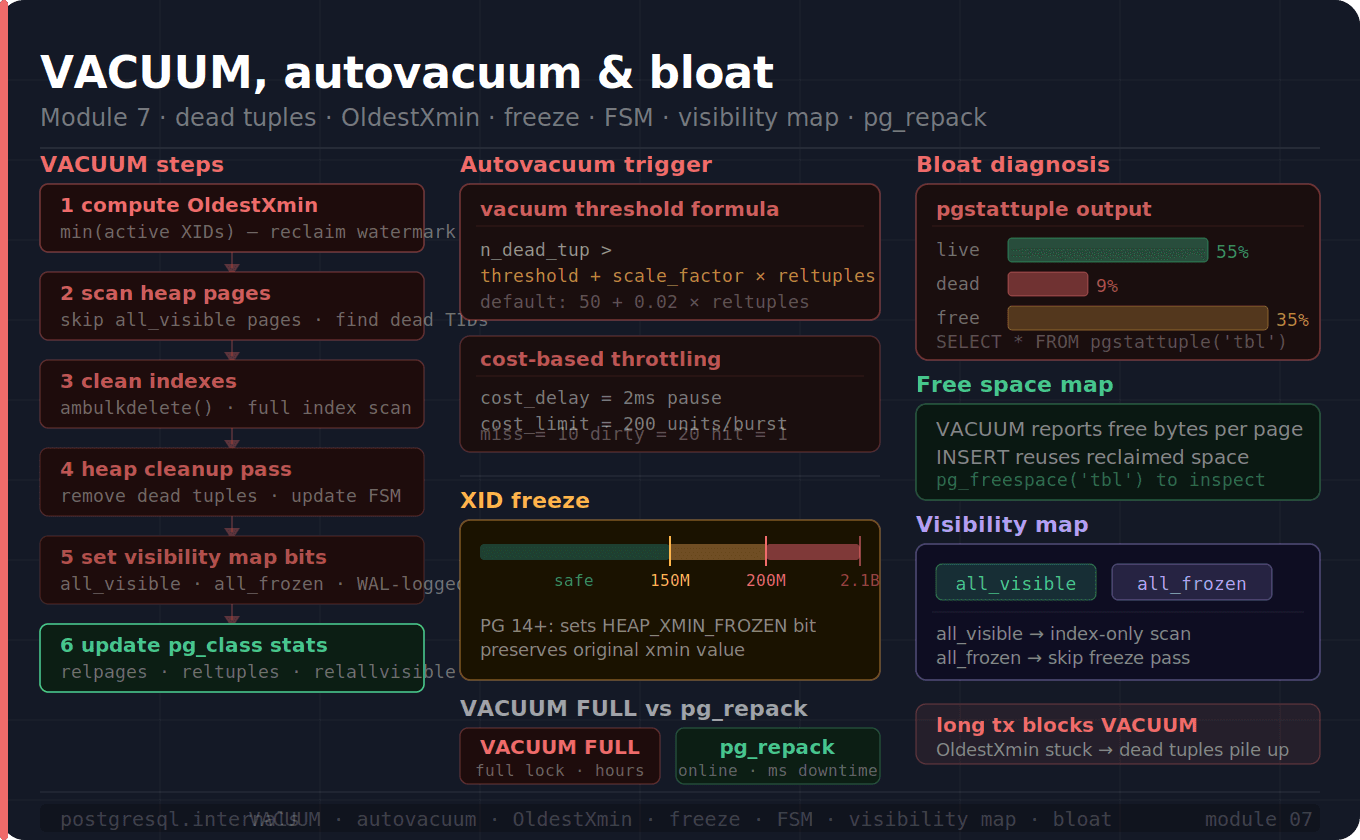
In the previous blog, we studied about the Index in the PostgreSQL, how they will be picked to generate a query plan, different types of indexes available in PostgreSQL. And we ended the blog with possible chance of bloat in indexes when the frequent deletes happen.
In this blog, we'll explore how VACUUM cleans dead tuples and removes bloat, how it prevents XID wraparound, and how autovacuum - PostgreSQL's background maintenance engine decides when and how aggressively to act.
Part 1: Why VACUUM Exists?
Every write operation in PostgreSQL creates a debt that must eventually be paid. For example:
INSERT → writes 1 new tuple
       → debt: none (yet)

UPDATE → writes 1 new tuple version
       → marks old tuple dead (xmax set)
       → writes 1 new index entry per index (assume N indexes)
       → marks old index entries dead
       → debt: 1 dead heap tuple + N dead index entries

DELETE → marks tuple dead (xmax set)
       → marks index entries dead
       → debt: 1 dead heap tuple + N dead index entries
This debt accumulates on every page. And Dead tuples cause:
Waste space: pages fill with unreachable data
Slow scans: every scan reads and discards dead tuples
Block index-only scans -
all_visiblebit cannot be set while dead tuples existsRisk wraparound - old
xminvalues must be frozen before XID space/range exhausts
And VACUUM is the debt collector, whose responsibility to clear all the debt being created, which will discuss in the next part in clear.
Part 2: What VACUUM Actually Does?
VACUUM on a table is not a single operation. It is a sequence of precise steps
Step 1: Acquire ShareUpdateExclusiveLock
VACUUM orders;VACUUM acquires ShareUpdateExclusiveLock - the weakest table lock. This:
Allows concurrent
SELECT,INSERT,UPDATEandDELETEBlock concurrent
VACUUM- only one VACUUM/table at a timeBlocks DDL statements on the table like
ALTER TABLEandDROP TABLE
This is why standard VACUUM does not block normal operations. VACUUM FULL is different altogether, it acquires AccessExclusiveLock and blocks everything.
Step 2: Compute OldestXmin
Before touching any page, VACUUM computes OldestXmin - the oldest transaction ID that any active transaction could need to see:
OldestXmin = min(
    all active transaction XIDs,
    all open cursor XIDs,
    all prepared transaction XIDs,
    all replication slot restart_lsn XIDs
)
Any tuple with xmax < OldestXmin is dead to everyone i.e., no active transaction can ever see it again. These are safe to remove.
Step 3: Scan the heap - page by page
VACUUM reads every heap page sequentially. For each page, it performs the following checks:
1. Read page into shared buffers

2. Check visibility map:
   if all_visible bit SET → SKIP this page entirely
      i.e., no dead tuples possible, no work to do here
   if all_frozen bit SET → SKIP for freeze pass too

3. For each tuple on page:
   a. Check xmin/xmax against OldestXmin
   b. If dead (xmax < OldestXmin AND xmax is COMMITTED)
         add to dead_tuples[] array (stored in maintenance_work_mem)
   c. If live but xmin old enough for freezing
         mark for freeze (set HEAP_XMIN_FROZEN bit)
         WAL - log the change

4. If any tuples frozen: WAL - log a FREEZE record
The dead_tuples[] array in maintenance_work_mem accumulates the TIDs of dead tuples. When it fills up, VACUUM must flush it by cleaning indexes before it can continue scanning the heap; this is why maintenance_work_mem matters for VACUUM performance.
Step 4: Clean Indexes
For each index on the table, VACUUM calls ambulkdelete() :
For B-Tree:
    Scan index leaf page
    For each index entry whose TID is in dead_tuples[]:
        mark the index entry as dead (LP_DEAD flag)
    Return count

This is O(indexSize), not O(deadTuples) complexity
Why? VACUUM must scan the entire index to find dead entries
This is why a table with many indexes is expensive to VACUUM. Each index gets a full scan.
Step 5: Heap Cleanup
After index cleanup, VACUUM makes a second pass (first is to mark dead tuples) over the heap pages that had dead tuples:
For each page with dead tuples:
  1. Remove dead tuple data
  2. Update ItemId flags: LP_DEAD → LP_UNUSED
  3. Compact the page (shift live tuples toward the end)
  4. Update pd_lower (free space pointer moves back)
  5. Update FSM: report new free space to free space map
  6. If ALL tuples on page are visible to everyone:
       set all_visible bit in visibility map
  7. If ALL tuples on page are frozen:
       set all_frozen bit in visibility map
  8. WAL-log all changes
Step 6: Update Statistics
Once all the above steps done, it's time for the VACUUM to update the stats in pg_class , pg_stat_user_tables and Truncate trailing empty pages if possible.
1. Update pg_class:
   relpages    ← new page count estimate
   reltuples   ← new live tuple count estimate
   relallvisible ← pages with all_visible bit set

2. Update pg_stat_user_tables:
   n_dead_tup  ← reset to 0
   last_vacuum ← now()
Part 3: Freezing - Preventing XID Wraparound
XID is 32bit. After ~4 billion transactions, it wraps around i.e., transaction IDs restart from 3 (XIDs 0–2 are reserved for system use). Without intervention, old tuples with small xmin values would appear to be "in the future" - invisible to everyone and causes database corruption.
The freeze threshold
Following parameters control when tuples are frozen:
vacuum_freeze_min_ageA tuple is eligible for freezing when its
xminis this many transactions old. VACUUM won't freeze newer tuples.Default:
50MXIDs
vacuum_freeze_table_ageWhen the table's
relfrozenxidis this old, VACUUM performs an aggressive freeze scan - visits every page regardless of the visibility map.Default:
150MXIDs
autovacuum_freeze_max_ageWhen a table's relfrozenxid reaches this age, autovacuum is forced to run on it - even if it's otherwise inactive. This is the safety net. If it triggers, you have a problem.
Default:
200MXIDs
What freezing does?
-- Before freeze;
-- t_xmin = 9582, t_infomask = 0x0100 (HEAP_XMIN_COMITTED)

VACUUM FREEZE orders;

-- After freeze
-- t_xmin = 9582 (UNCHANGED - PG 14+ preserves original XID)
-- t_infomask = 0x0300 (HEAP_XMIN_COMMITTED | HEAP_XMIN_FROZEN)
   -- added frozen bit (0x0200)
Once frozen bit is set, XID value becomes irrelevant and never be checked again for freezing or vacuuming.
Monitor wraparound proximity
-- Most critical query for PostgreSQL health:
SELECT datname,
       age(datfrozenxid)                          AS xid_age,
       2000000000 - age(datfrozenxid)             AS xids_remaining,
       round(100.0 * age(datfrozenxid) / 2000000000, 2) AS pct_toward_wraparound
FROM pg_database
ORDER BY age(datfrozenxid) DESC;

-- Per-table view:
SELECT schemaname,
       relname,
       age(relfrozenxid)                          AS table_xid_age,
       pg_size_pretty(pg_total_relation_size(relid)) AS size
FROM pg_stat_user_tables
ORDER BY age(relfrozenxid) DESC
LIMIT 20;

-- ⚠️  WARNING thresholds:
-- age > 1,500,000,000 → URGENT: manual VACUUM FREEZE immediately
-- age > 1,800,000,000 → CRITICAL: PostgreSQL will shut down soon
-- age > 2,100,000,000 → PostgreSQL refuses new transactions
Part 4: Autovacuum - The Background Maintenance Engine
Manual VACUUM is not practical at scale. Autovacuum runs in the background automatically. Understanding its decision algorithm is essential for tuning it.
Autovacuum Architecture
postmaster
  └── autovacuum launcher  (1 process, always running)
        └── autovacuum worker  (up to autovacuum_max_workers, default 3)
              └── one worker per database, one table at a time
The launcher wakes up every autovacuum_naptime seconds (default: 1 minute), checks pg_stat_user_tables for tables needing work, and forks workers.
The Vacuum trigger formula
A table is eligible for autovacuum when:
n_dead_tup > autovacuum_vacuum_threshold + autovacuum_vacuum_scale_factor × reltuples

Default:
  n_dead_tup > 50 + 0.02 × reltuples
  = dead tuples exceed 50 + 2% of live tuples

Example:
  Table with 10,000,000 rows:
  threshold = 50 + 0.02 × 10,000,000 = 200,050 dead tuples
  → autovacuum triggers after 200K dead tuples accumulate

  Table with 1,000 rows:
  threshold = 50 + 0.02 × 1,000 = 70 dead tuples
  → triggers after just 70 dead tuples
The Analyze trigger formula
n_mod_since_analyze > autovacuum_analyze_threshold + autovacuum_analyze_scale_factor × reltuples

Default:
  n_mod_since_analyze > 50 + 0.1 × reltuples
  = modifications exceed 50 + 10% of live tuples
Cost-based Throttling - why autovacuum seems slow
Autovacuum is intentionally throttled to avoid I/O saturation:
autovacuum_vacuum_cost_delay    = 2ms   (pause between cost limit hits)
autovacuum_vacuum_cost_limit    = 200   (cost units before pausing)

Cost per operation:
  vacuum_cost_page_hit   = 1    (page found in shared_buffers)
  vacuum_cost_page_miss  = 10   (page read from disk)
  vacuum_cost_page_dirty = 20   (page dirtied by VACUUM)

Example: 100% cache miss workload
  200 cost limit / 10 cost per miss = 20 pages per 2ms burst
  = 20 pages × 8KB = 160KB per 2ms
  = ~80 MB/s maximum VACUUM throughput
  For a 100GB table: 100GB / 80MB/s ≈ 21 minutes minimum
This is by design — autovacuum should not compete with your production workload. But if it can't keep up with your write rate, you need to tune cost limits and scale factors per table:
-- Per-table autovacuum tuning (overrides global settings):
ALTER TABLE orders SET (
    autovacuum_vacuum_scale_factor = 0.01,   -- trigger at 1% instead of 2%
    autovacuum_vacuum_cost_delay = 0,         -- no throttling for this table
    autovacuum_vacuum_cost_limit = 1000       -- higher cost limit
);

-- For large, frequently-updated tables:
ALTER TABLE events SET (
    autovacuum_vacuum_scale_factor = 0.005,  -- 0.5%
    autovacuum_vacuum_threshold = 1000,
    autovacuum_analyze_scale_factor = 0.02
);
Part 5: Table Bloat - Diagnosing the Problem
Bloat is the gap between the logical size of your data and the physical size of the files on disk. It comes in two forms.
Heap Bloat
-- Quick bloat estimate using pgstattuple:
CREATE EXTENSION pgstattuple;

SELECT * FROM pgstattuple('orders');
-- table_len        = 1073741824  (1 GB physical size)
-- tuple_count      = 5000000     (live rows)
-- tuple_len        = 600000000   (bytes used by live tuples)
-- tuple_percent    = 55.9        (% of pages with live data)
-- dead_tuple_count = 800000      (dead rows)
-- dead_tuple_len   = 96000000    (bytes used by dead tuples)
-- dead_tuple_percent = 8.9       (% of pages with dead data)
-- free_space       = 377741824   (free bytes in pages)
-- free_percent     = 35.2        ← 35% of the table is wasted!

-- Full bloat scan (slow but accurate):
SELECT pg_size_pretty(table_len)          AS total,
       pg_size_pretty(tuple_len)          AS live_data,
       pg_size_pretty(dead_tuple_len)     AS dead_data,
       pg_size_pretty(free_space)         AS free,
       round(dead_tuple_percent::numeric, 1) AS dead_pct,
       round(free_percent::numeric, 1)    AS free_pct
FROM pgstattuple('orders');
Index Bloat
-- Index bloat via pgstattuple:
SELECT * FROM pgstatindex('idx_orders_status');
-- index_size        = 209715200   (200 MB)
-- leaf_pages        = 24000
-- empty_pages       = 1200        ← pages with no live entries
-- deleted_pages     = 3400        ← pages fully reclaimed
-- avg_leaf_density  = 68.4        ← B-tree pages 68% full (100% = no bloat)
-- leaf_fragmentation = 12.3       ← % of leaf pages out of logical order

-- Bloat estimate without pgstattuple (from catalog stats):
SELECT
    indexrelname,
    pg_size_pretty(pg_relation_size(indexrelid)) AS index_size,
    round(100.0 * pg_relation_size(indexrelid) /
          nullif(pg_total_relation_size(relid), 0), 1) AS pct_of_table,
    idx_scan,
    idx_tup_read,
    idx_tup_fetch
FROM pg_stat_user_indexes
WHERE relname = 'orders'
ORDER BY pg_relation_size(indexrelid) DESC;
Once you've confirmed severe bloat with the queries above, standard VACUUM won't be enough, it can only reclaim space within existing pages, not shrink the file itself.
Part 6: VACUUM FULL vs pg_repack
When bloat is severe, standard VACUUM cannot help - it reclaims space within pages but cannot return pages to the OS or compact the file. For that you need a table rewrite.
VACUUM FULL
VACUUM FULL orders;What it does:
Acquires
AccessExclusiveLock- blocks all reads and writesCreates a brand new heap file
Copies all live tuples into the new file (compact)
Rebuilds all indexes from scratch
Drops the old file
Releases lock
Vacuum full also reset
relfrozenxidto the current XID - so after a VACUUM FULL, the table's wraparound age resets to 0
Pros: Table is fully compacted; all bloat is eliminated.
Cons:
Complete table lock for the entire duration
duration = proportional to table size
100GB table = potentially hours of downtime
pg_repack - zero-downtime alternative
-- Install
CREATE EXTENSION pg_repack;

-- Repack a table online
pg_repack -d mydb -t orders

-- Repack only indexes (even faster)
pg_repack -d mydb -t orders --only-indexes
How pg_repack works without locking:
Create a new empty table (shadow table)
Copy all live tuples to shadow table (no lock, reads allowed)
Create a trigger on original table: log all changes to a delta table
Apply delta changes to shadow table (catch up with live writes)
Repeat step 4 until delta is small (milliseconds of lag)
Acquire brief
AccessExclusiveLock(milliseconds only)Apply final delta, swap table OIDs, drop original
Release lock
Downtime = milliseconds (just the final OID swap), not hours.
VACUUM FULL:  simple, built-in, requires maintenance window
pg_repack:    complex, extension required, truly online
Part 7: Reading VACUUM VERBOSE Output
VACUUM (VERBOSE, ANALYZE) orders;INFO: vacuuming "public.orders"
INFO: scanned index "orders_pkey" to remove 84000 row versions -- index cleanup pass
DETAIL: CPU: user: 0.42s, system: 0.08s, elapsed: 1.23s
INFO: scanned index "idx_orders_status" to remove 84000 row versions
DETAIL: CPU: user: 0.38s, system: 0.05s, elapsed: 1.01s
INFO: "orders": removed 84000 row versions in 7200 pages -- heap cleanup
DETAIL: CPU: user: 0.12s, system: 0.04s, elapsed: 0.18s
INFO: index "orders_pkey" now contains 5000000 row versions in 14000 pages
DETAIL: 84000 index row versions were removed.
0 index pages have been deleted, 0 are currently reusable.
INFO: "orders": found 84000 removable, 5000000 nonremovable row versions
in 62800 out of 62800 pages
DETAIL: 0 dead row versions cannot be removed yet, oldest xmin: 1234567
There were 12000 unused item identifiers. -- reusable slots
Skipped 0 pages due to buffer pins, 0 frozen pages.
0 pages are entirely empty.
CPU: user: 1.24s, system: 0.23s, elapsed: 4.87s
INFO: analyzing "public.orders"
INFO: "orders": scanned 30000 of 62800 pages, containing 2400000 live rows
and 0 dead rows; 30000 rows in sample, 5000000 estimated total rowsAfter running VACUUM VERBOSE, these are the numbers that tell you whether VACUUM did its job:
84000 removable row versions   → dead tuples successfully collected
0 cannot be removed yet        → blocked by long-running transaction
Skipped N frozen pages         → visibility map working (those pages skipped)
0 pages entirely empty         → no file truncation possible (no trailing empty pages)
14000 pages in pkey index      → index is growing
Conclusion
In this module, we explored how VACUUM and autovacuum work under the hood, starting from:
Why VACUUM exists? every
UPDATEandDELETEleaves dead tuples and dead index entries behind due to MVCC's append-only write model, and without VACUUM the table grows forever, index-only scans stop working, and XID wraparound eventually corrupts the entire database.The exact VACUUM sequence: computing
OldestXminas the reclaim watermark, scanning heap pages while skippingall_visibleones, collecting dead TIDs intomaintenance_work_mem, cleaning indexes viaambulkdelete(), compacting pages, updating the FSM, and setting visibility map bits.How autovacuum decides when to act: the trigger formula, cost-based throttling parameters, and how to tune aggressiveness per table using
ALTER TABLE ... SET (autovacuum_vacuum_scale_factor = ...)for large high-churn tables.How XID freezing prevents wraparound: setting the
HEAP_XMIN_FROZENinfomask bit in PostgreSQL 14+, the three age thresholds that control when freezing happens, and how to monitor proximity to the 2.1 billion XID danger zone usingage(datfrozenxid).When to use
VACUUM FULLversuspg_repack: full table lock for hours versus online shadow-table rewrite with milliseconds of downtime.
What's Next → Module 8: Concurrency & Locking
We've now seen that VACUUM itself needs locks to run, that long-running transactions block OldestXmin from advancing, and that VACUUM FULL holds AccessExclusiveLock for its entire duration. Module 8 goes into the locking system itself; the full lock hierarchy from AccessShareLock to AccessExclusiveLock, how row-level locks work through xmax and MultiXactId rather than a lock table, deadlock detection, advisory locks, and the pg_locks queries that diagnose blocking in production.
Enjoyed this post?
3 reactions