PostgreSQL Internals - Module 2: Page Layout & Storage Internals
Part 2 of 9 in PostgreSQL Internals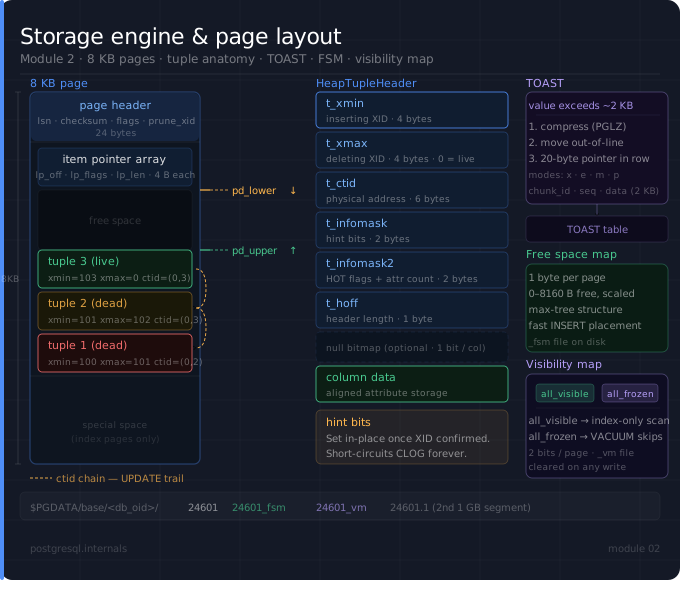
In the previous module, we explored Process & Memory Architecture.
Now we move deeper into how PostgreSQL physically stores data on disk, one of the most important internals topics.
Everything in PostgreSQL ultimately lives in 8KB pages on disk. Understanding this layout is the foundation for everything that follows: MVCC, indexes, VACUUM, bloat. Let's deep dive into this byte by byte.
Part 1: How PostgreSQL Organizes File on Disk
Physical Hierarchy
$PGDATA/
   - base/ ← All Databases resides here
      - 16384/ ← One Directory per each Database named after DB's OID
          - 24601 ← Table File (Heap)
          - 24601_fms ← Free Space Map
          - 24601_vm ← Visibility Map
          - 24608 ← Index File
   - pg_wal/ ← WAL Segments
   - pg_xact/ ← CLOG (Commit Logs)
   - global/ ← Cluster-wide Tables like pg_database etc..
   - postgresql.conf ← cluster configuration file
Every table and index is stored as a relation file, splits into 1GB segments if the file size grows behind that.
-- Find the actual file for a table
SELECT pg_relation_filepath('orders');
-- Example: base/16384/24601

-- See the OID of your current database
SELECT oid, datname FROM pg_database WHERE datname = current_database();
-- Example: 12737/postgres
TableSpaces
By default everything i.e databases, tables etc., lives under "$PGDATA/base". But if you want to store your tables somewhere else on the different disk, tablespaces let you do that.
Example:
CREATE TABLESPACE sample_ts LOCATION '/Users/samba/pg';
CREATE TABLE hot_data (...) TABLESPACE sample_ts;

-- Find the actual file for 'hot_data' table
SELECT pg_relation_filepath('hot_data');
-- Returns: pg_tblspc/34632/PG_11_201809051/12737/34633
Internally a tablespace is a symlink under '$PGDATA/pg_tblspc/' pointing to the real directory i.e '/Uses/samba/pg'.
Part 2: The 8KB Page - Every Byte Explained
Every data file (table, index, etc..) is a sequence of fixed-size pages.
Default Size: 8192 Bytes
Here is the exact layout of a page in PostgreSQL
---------------------------------------------------- ← byte 0
PageHeaderData (24 bytes)
  pd_lsn         (8 bytes)
  pd_checksum    (2 bytes)
  pd_flags       (2 bytes)
  pd_lower       (2 bytes)
  pd_upper       (2 bytes)
  pd_special     (2 bytes)
  pd_pagesize    (2 bytes)
  pd_prune_xid   (4 bytes)
----------------------------------------------------  ← byte 24
ItemId Array (line pointer array)
[0] lp_off=8160, lp_flags=1, lp_len=64 (4 bytes)
[1] lp_off=8090, lp_flags=1, lp_len=68 (4 bytes)
...
----------------------------------------------------  ← pd_lower
FREE SPACE
(pd_lower, pd_upper grows toward each other)
----------------------------------------------------  ← pd_upper
Actual Data
  Tuple N (newest, highest address end)
  ...
  Tuple 3
  Tuple 2
  Tuple 1 (oldest, lowest address in tuple area)
----------------------------------------------------  ← pd_special
Special Space (index pages only)
(empty for heap pages)
----------------------------------------------------  ← byte 8192
Here, item pointers grow downward from byte 24, while Tuples grow upward from byte 8192. FREE SPACE is the gap between the pd_lower and pd_upper. When pd_lower >= pd_upper, the page is full and tuples will be inserted into new page.
Page Header
pd_lsn
8 bytes: LSN of last WAL record for this page
It will be helpful in case of WAL replays, it checks pd_lsn to know if the data page already has that new change.
pd_checksum
2 bytes: checksum (if enabled)
pd_flags
2 bytes: PD_HAS_FREE_LINES, PD_PAGE_FULL, PD_ALL_VISIBLE
pd_lower
2 bytes: offset of start of free space
pd_upper
2 bytes: offset to end of free space
pd_special
2 bytes: offset to start of special space
pd_pagesize
2 bytes: page size + version
pd_prune_xid
4 bytes: oldest prunable XID for VACUUM
ItemId Array
Each ItemId is a 4 bytes encoding three details:
lp_off: byte offset of the tuple within the page i.e where the tuple exists in the page.
lp_flags: 0=unused, 1=normal, 2=redirect, 3=dead
lp_len: length of the tuple in bytes
4 bytes = 32 bits, in which
0..12 represents lp_len
13..14 represents lp_flags
15..31 represents lp_off
Part 3: The Tuple
Now, we have entered into main block of a page, the Tuple. A tuple (row) stored on a page has two parts: a header and the data.
----------------------------------------------------
HeapTupleHeader (23 bytes)
  t_xmin (4 bytes)
  t_xmax (4 bytes)
  t_cid  (4 bytes)
  t_ctid (6 bytes)
    - block number  (4 bytes)
    - offset number (2 bytes)
  t_infomask2 (2 bytes)
  t_infomask  (2 bytes)
  t_hoff      (1 byte)
----------------------------------------------------
NULL bitmap (optional, 1 bit per column)
----------------------------------------------------
OID (optional, 4 bytes, if with OIDS)
----------------------------------------------------
Actual column data
  col1 | col2 | col3 | ... | colN
----------------------------------------------------
And each field denotes:
t_xmin: stores the Transaction ID (XID) of the transaction which created/inserted this tuple into the table.
t_xmax: stores the XID of the transaction which deleted this tuple (0=live)
t_cid: command ID i.e in a transaction, if we ran 3 inserts and 2nd insert actually insert this row, t_cid points to 1 (0th indexed)
t_ctid: Physical location of the tuple i.e (block_number, offset)
This tuple exists at this position (offset) in this block/page (block_number)
if ctid = (3,2) means in second item in the page 3
t_infomask2: Holds HOT tuple flags or Lock information
t_infomask: Holds tuple property bits
t_hoff: Size of the header
Actually we can query these header information using the Hidden system columns added to each row by the PostgreSQL
-- These columns exist on every table but are hidden by default
SELECT xmin, xmax, cmin, cmax, ctid, tableoid, * FROM orders LIMIT 5;

-- Here
  -- xmin == t_xmin
  -- xmax == t_xmax
  -- cmin == t_cid (Sets within the inserting transaction)
  -- cmax == t_cid (Sets within the deleting transaction)
  -- ctid == t_ctid
  -- tableoid = OID of the table
t_infomask Bits
t_infomask is a 16-bit field which tells the state of the tuple. Some states are as follow
HEAP_HASNULL - has null attributes
HEAP_HASEXTERNAL - has TOAST pointers
HEAP_XMIN_COMMITTED - xmin was committed
HEAP_XMIN_INVALID - xmin is aborted/invalidated
HEAP_XMAX_COMMITTED - xmax was committed
HEAP_XMAX_INVALID - xmax is aborted/invalidated
and many more...
Hint bits (HEAP_XMIN_COMMITTED, HEAP_XMAX_COMMITTED) are the performance optimization that makes MVCC cheap. When a backend first visits a tuple, it checks CLOG to resolve the transaction status. Once it confirms the XID committed or aborted, it sets the hint bit directly on the tuple so future readers never have to consult CLOG again. This is a write without WAL (called a "hint bit write") — one of PostgreSQL's rare non-logged writes.
Part 4: The ctid Chain - What UPDATE Really Does
This is where MVCC (Multi-Version Concurrency Control) becomes concrete. When you UPDATE a row/tuple, PostgreSQL does not modify the tuple in place, instead creates a new tuple and mark existing one dead.
CREATE TABLE orders (id int, status text);

-- Insert first row (assume TransactionID (XID) = 100)
INSERT INTO orders (id, status) VALUES (1, 'pending');
-- Tuple at ctid = (0,1), xmin = 100, xmax = 0 (live)

-- Now update the above order (XID = 101)
UPDATE orders SET status = 'shipped' WHERE id = 1;
-- Old tuple at (0,1): xmin = 100, xmax = 101, ctid = (0,2) ← xmax set, ctid points forward
-- New tuple at (0,2): xmin = 101, xmax = 0, ctid = (0,2) ← live

-- Now update the status again (XID = 102)
UPDATE orders SET status='delivered' WHERE id=1;
-- Old tuple at (0,1): xmin=100, xmax=101, ctid=(0,2)   ← dead
-- Old tuple at (0,2): xmin=101, xmax=102, ctid=(0,3)   ← dead
-- New tuple at (0,3): xmin=102, xmax=0,   ctid=(0,3)   ← live
The ctid on dead tuples forms a forward chain to the current version. This chain is what VACUUM follows to clean up dead tuples.
Part 5: TOAST - Handling Large Values
As we know by now, that the PostgreSQL's page size is 8KB. What happens when a column value is larger that won't fit in a 8KB size page? To handle this PostgreSQL uses a technique called TOAST (The Oversized-Attribute Storage Technique)
TOAST storage strategies
Below are the storage strategies per column used by this technique:
plain (p) - no TOAST, data never compressed
external (e) - TOAST, no compression
extended (x) - compress first, if still large then TOAST (Default for text, bytea columns)
main (m) - compress first, keep inline if possible
What happens when a value is too big:
Compression first: If 'x' or 'm' storage using PGLZ algorithm.
Still too big? Move it out of line to the TOAST table.
In the main table: store a 20-byte TOAST pointer (pointing to the row in TOAST table) by replacing the value.
Every table with toastable columns has a TOAST table. One can find that by using the following query:
SELECT relname, reltoastrelid::regclass AS toast_table
FROM pg_class WHERE relname = 'orders';
The TOAST table itself stores large values in 2KB chunks, each as a row with columns chunk_id, chunk_seq, chunk_data. PostgreSQL reassembles them transparently under the hood when queried.
Part 6: Free Space Map (FSM) & Visibility Map (VM)
For every table there exists two companion files as showed in the part 1:
Free Space Map (tableoid_fsm)
Visibility Map (tableoid_vm)
Free Space Map
Tracks how much free space is available on each page, so INSERT and UPDATE can find space quickly without scanning the whole file.
Stores a 1-byte value per page (0–255), scaled to represent 0–8160 bytes
Organized as a tree of max values: each interior node holds the max of its children
To find a page with at least N free bytes: walk the tree from root
After DELETE or VACUUM, the FSM is updated so that freed space becomes available.
Visibility Map
Holds 2 bits per a heap page:
Bit 0: all_visible - all tuples on this page are visible to ALL transactions.
Bit 1: all_frozen - all tuples are frozen (XID = FrozenTransactionId)
Why it matters:
VACUUM efficiency: If all_visible = 1, VACUUM can skip the page entirely as there are no dead tuples in the page.
Freezing: If all_frozen = 1, VACUUM never needs to visit this page for XID wraparound prevention
-- See visibility map stats
SELECT relname,
       n_live_tup,
       n_dead_tup,
       all_visible        -- pages with all_visible bit set
FROM pg_stat_user_tables
WHERE relname = 'orders';

-- Force update of visibility map
VACUUM orders;
Part 7: Hands-On - Inspect Everything live
For this hands-on experience we are going to use pageinspect & pg_freespacemap extensions which comes along with PostgreSQL.
-- 1. Install pageinspect & pg_freespacemap
CREATE EXTENSION IF NOT EXISTS pageinspect;
CREATE EXTENSION IF NOT EXISTS pg_freespacemap;

-- 2. Create a test table
CREATE TABLE page_demo (id int, name text);
INSERT INTO page_demo VALUES (1,'alice'),(2,'bob'),(3,'charlie');

-- 3. Read the raw page header
SELECT * FROM page_header(get_raw_page('page_demo', 0));
-- lsn | checksum | flags | lower | upper | special | pagesize | version | prune_xid
--  0/9E92C40 | 0 | 0 | 36 | 8080 | 8192 | 8192 | 4 | 0

-- 4. Read all item pointers on page 0
SELECT lp, lp_off, lp_flags, lp_len
FROM heap_page_items(get_raw_page('page_demo', 0));
-- lp | lp_off | lp_flags | lp_len
--  1 |   8152 |        1 |     34
--  2 |   8120 |        1 |     32
--  3 |   8080 |        1 |     36

-- 5. Read the actual tuples with MVCC info
SELECT lp, t_xmin, t_xmax, t_ctid, t_infomask, t_data
FROM heap_page_items(get_raw_page('page_demo', 0));
--  lp | t_xmin | t_xmax | t_ctid | t_infomask |           t_data
--   1 |   9524 |      0 | (0,1)  |       2050 | \x010000000d616c69636
--   2 |   9524 |      0 | (0,2)  |       2050 | \x0200000009626f62
--   3 |   9524 |      0 | (0,3)  |       2050 | \x0300000011636861726

-- 6. Now DELETE a row and see what changes
DELETE FROM page_demo WHERE id = 2;

SELECT lp, t_xmin, t_xmax, t_ctid, t_infomask
FROM heap_page_items(get_raw_page('page_demo', 0));
--  lp | t_xmin | t_xmax | t_ctid | t_infomask
--   1 |   9524 |      0 | (0,1)  |       2306
--   2 |   9524 |   9525 | (0,2)  |        258
--   3 |   9524 |      0 | (0,3)  |       2306
-- Row 2 now has t_xmax set — it's dead but still physically present!

-- 7. See free space per page
SELECT * FROM pg_freespace('page_demo');
-- blkno | avail
--     0 |     0

-- 8. Calculate page fill ratio
SELECT
    blkno,
    avail,
    round(100.0 * avail / 8192, 1) AS pct_free
FROM pg_freespace('page_demo')
ORDER BY blkno;
-- blkno | avail | pct_free
--     0 |     0 |      0.0

-- 9. Confirm TOAST table exists
SELECT relname, reltoastrelid::regclass AS toast
FROM pg_class WHERE relname = 'page_demo';
--  relname  |          toast
-- page_demo | pg_toast.pg_toast_26278
-- Since table has text column, by default toast table will be created

-- 10. See the hidden system columns directly
SELECT ctid, xmin, xmax, id, name FROM page_demo;
-- ctid  | xmin | xmax | id |  name
-- (0,1) | 9524 |    0 |  1 | alice
-- (0,3) | 9524 |    0 |  3 | charlie
-- See even though 2nd row exists physically it won't be part of result since that tuple is considered dead

-- 11. ctid chain
-- Run following
UPDATE page_demo SET name = 'sheldon' WHERE id = 3;
-- Now with the row ctid (0,3) points to (0,4)
UPDATE page_demo SET name = 'howard' WHERE id = 3;
-- Row with ctid (0,4) points to (0,5)
UPDATE page_demo SET name = 'leonard' WHERE id = 3;
-- Row with ctid (0,5) points to (0,6)
SELECT lp, t_xmin, t_xmax, t_ctid, t_infomask
FROM heap_page_items(get_raw_page('page_demo', 0));
-- lp | t_xmin | t_xmax | t_ctid | t_infomask
--  1 |   9524 |      0 | (0,1)  |       2306 (no change)
--  2 |   9524 |   9525 | (0,2)  |       1282 (2nd row)
--  3 |   9524 |   9526 | (0,4)  |       1282 (1st update)
--  4 |   9526 |   9527 | (0,5)  |       9474 (2nd update)
--  5 |   9527 |   9528 | (0,6)  |       8450 (3rd update)
--  6 |   9528 |      0 | (0,6)  |      10242 (Above chains pointing to this row)

-- Before VACUUM, we have 6 line pointers, now we run the VACUUM
-- 12. VACUUM
VACUUM page_demo;

-- Now again check page 0 as like before but we are querying lp_off, lp_flags
SELECT lp, lp_off, lp_flags, t_xmin, t_xmax, t_ctid, t_infomask                                                                                                                                                                                                     FROM heap_page_items(get_raw_page('page_demo', 0));
-- lp | lp_off | lp_flags | t_xmin | t_xmax | t_ctid | t_infomask
--  1 |   8152 |        1 |   9524 |      0 | (0,1)  |       2306
--  2 |      0 |        0 |        |        |        |
--  3 |      6 |        2 |        |        |        |
--  4 |      0 |        0 |        |        |        |
--  5 |      0 |        0 |        |        |        |
--  6 |   8112 |        1 |   9528 |      0 | (0,6)  |      10498

-- What happened after VACUUM?
-- Dead tuples removed
-- Some line pointers become unused
-- One pointer becomes redirected (HOT chain)
Hot Chain
If we see the result after the VACUUM, we can see line pointer 3 has lp_off and lp_flags set.
lp_off = 6 and lp_flags = 2
This is Hot Redirect Pointer. And This happens during HOT (Heap Only Tuple) update
Original tuple (lp 3)
     ↓ update
New tuple (lp 6)
Instead of index update, PostgreSQL creates redirect
lp3 → lp6This is to avoid unnecessary Index changes.
Conclusion
In this module, we explored how PostgreSQL physically stores data on disk. Starting from the $PGDATA directory structure, we moved down to relation files, 8KB pages, tuple layout, and MVCC metadata.
We saw that PostgreSQL stores everything inside fixed-size pages, and each row is stored as a tuple with transaction information. This is what enables PostgreSQL’s MVCC, where UPDATE and DELETE create new versions instead of modifying rows in place.
We also looked at how PostgreSQL handles:
Large values using TOAST
Free space tracking using Free Space Map (FSM)
Page visibility using Visibility Map (VM)
Finally, we used pageinspect and pg_freespacemap to inspect pages and tuples directly, making these internals easier to understand in practice.
Understanding these storage internals helps explain many PostgreSQL behaviors such as bloat, VACUUM, MVCC, and performance tuning.
What's Next → Module 3: MVCC & Transaction Isolation Levels
Now that we understand how PostgreSQL stores data on disk, the next step is to understand how PostgreSQL handles concurrency.
In Module 3, We are going to cover:
What is MVCC? And how PostgreSQL uses it?
How xmin, xmax determines the row/tuple visibility
Transaction Isolation Levels
How MVCC works together with VACUUM?
Subscribe to the newsletter and get notified via email whenever a new blog goes live.
Enjoyed this post?
9 reactions