PostgreSQL Internals - Module 1: Process & Memory Architecture
Part 1 of 9 in PostgreSQL Internals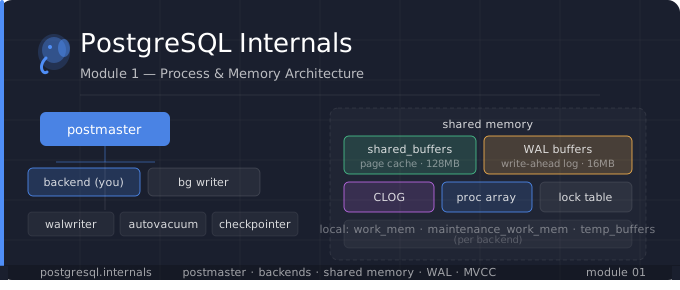
PostgreSQL is a widely known open-source relational database, but it's true strength lies beneath the surface, in the carefully engineered internals that makes the database reliable, better performer, and supports extensibility.
Today, we are going to learn about the Core module i.e Process & Memory Architecture, where we explore how postgres spans a new Backend Processes and Memory to them.
Part 1: How PostgreSQL Starts Up
When you run "pg_ctl start", here's exactly what happens:
The Postmaster Process
The Postmaster is the first and most important process. It is the parent of all other PostgreSQL processes. Its responsibilities:
Read postgresql.conf and pg_hba.conf.
Allocates shared memory (the buffer pool, WAL buffers, lock tables, etc.)
Listens on a TCP port (default 5432) or a Unix socket.
Forks background worker processes.
Accepts incoming client connections and forks a backend for each.
pg_ctl start
 ▼
postmaster (pid 1)
     ├── checkpointer
     ├── background writer
     ├── WAL writer
     ├── autovacuum launcher
     ├── stats collector
     └── [backend] ← forked per client connection
You can verify this yourself by running:
ps aux | grep postgres


You'll see output like:
-----------------------
postgres  1234  ... postgres: postmaster
postgres  1235  ... postgres: checkpointer
postgres  1236  ... postgres: background writer
postgres  1237  ... postgres: walwriter
postgres  1238  ... postgres: autovacuum launcher
postgres  1239  ... postgres: stats collector
postgres  1240  ... postgres: backend (mydb myuser 127.0.0.1) ← your connection
Part 2: What happens When a Client Connects
This is the sequence of how the client connections establishes and then querying works:
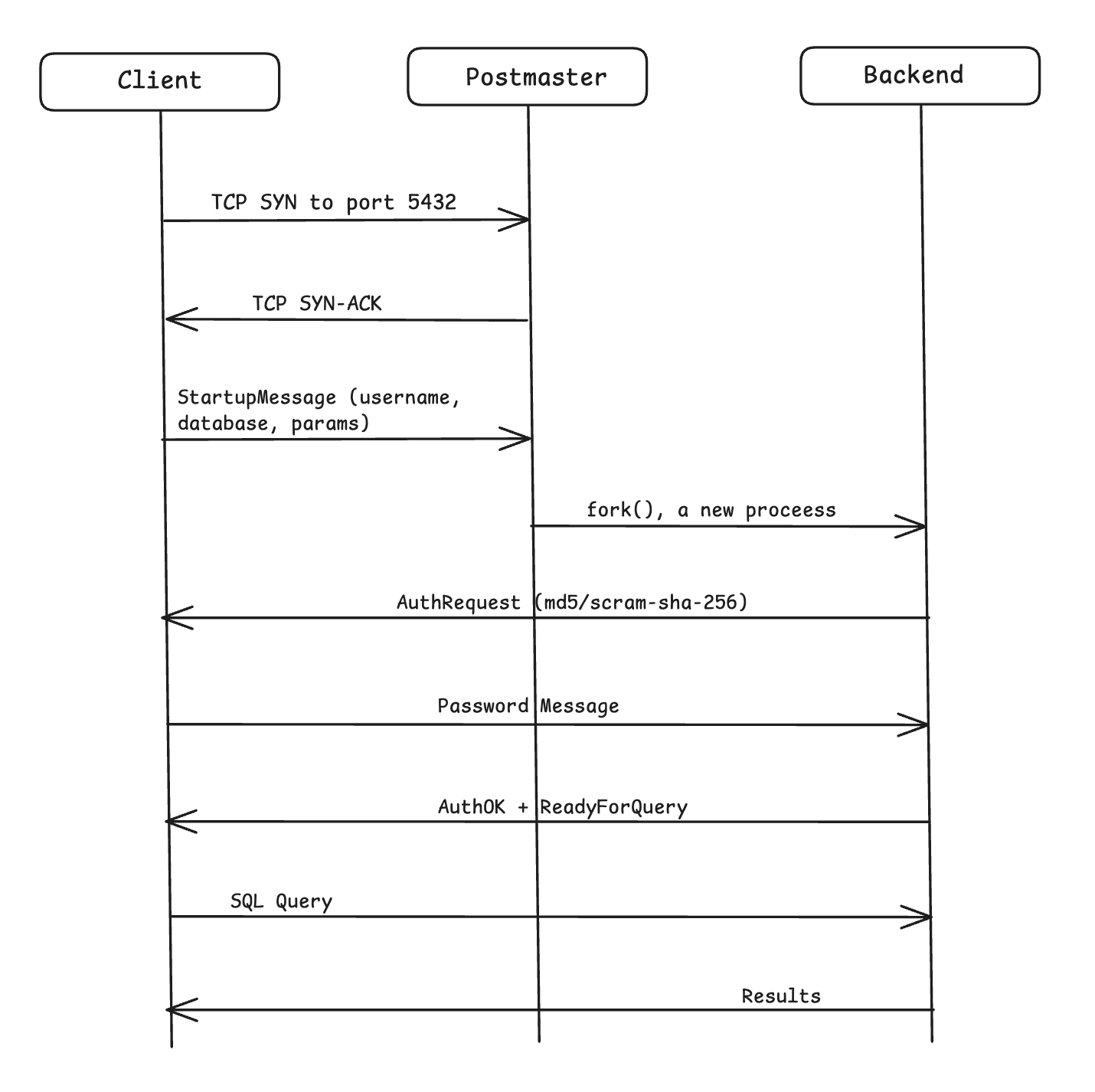
Once the backend is forked, the postmaster is completely out of the loop. The client communicates directly with its dedicated backend process for that entire session, and the postmaster never sees your SQL queries.
Part 3: Every Background Process
Checkpointer
What it does: Periodically flushes all dirty pages from the shared buffers to disk and writes a checkpoint record to WAL.
Why it matters: Without checkpoints, crash recovery would have to replay the entire WAL history from the beginning. A checkpoint creates a safe "restart point".
When it runs:
Every checkpoint_timeout seconds (default: 5 minutes)
When WAL size exceeds max_wal_size (default: 1GB)
On CHECKPOINT command
On clean shutdown
-- See last checkpoint info
SELECT * FROM pg_control_checkpoint();

-- Output includes:
-- checkpoint_lsn   = WAL location of last checkpoint
-- prior_lsn = previous checkpoint location
-- redo_lsn = where recovery would start from
-- checkpoint_time = when it happened
Background Writer (BGWriter)
What it does: Proactively writes dirty buffers from shared buffer pool to disk, before the checkpointer needs to.
Why it matters: When a backend needs a free buffer and none are available, it would have to write a dirty page itself, by stalling your query. BGWriter prevents this by keep cleaning the buffers available.
How it works:
Sleeps for bgwriter_delay ms (default: 200ms)
Wakes up, scans the buffer pool using a clock-sweep algorithm.
Writes up to bgwriter_lru_maxpages dirty buffers (default: 100)
Goes back to sleep
-- Monitory BGWrite activity
SELECT
  buffers_clean,         -- buffers written by bgwriter
  maxwritten_clean,      -- time bgwriter hit its page limit
  buffers_backend,       -- buffers written by backends
  buffers_checkpoint     -- buffers written by checkpoint
FROM pg_stat_bgwriter;
Note: If buffers_backend is high, your BGWriter can't keep up. Increase bgwriter_lru_maxpages or decrease bgwriter_delay
WAL Writer
What it does: Flushes WAL records from WAL buffers (in shared memory) to WAL files on disk.
Why it matters: COMMIT must guarantee durability. WAL must be on disk before COMMIT returns to the client. The WAL Writer batches these flushes efficiently.
How it works:
Wakes up every wal_writer_delay ms (default: 200ms)
Or immediately when wal_writer_flush_after bytes accumulate (default: 1MB)
Calls fysnc() or fdatasync() to ensure durability
Autovacuum Launcher + Workers
What it does: The launcher wakes up every autovacuum_naptime (default: 1min), checks pg_stat_user_tables, and forks worker processes for tables that need vacuuming.
Why it matters: Because of MVCC, dead tuples accumulate. Without vacuum, tables bloat and critically transaction ID wrap-around can occur.
-- See which tables autovacuum is targeting
SELECT relname,
       n_dead_tup,
       n_live_tup,
       last_autovacuum,
       last_autoanalyze
FROM pg_stat_user_tables
ORDER BY n_dead_tup DESC;
Stats Collector
Collects runtime statistics and writes them to files in "$PGDATA/pg_stat_tmp/". This feeds all the "pg_stat_*" views you query.
Part 4: Memory Architecture
PostgreSQL Memory is split into two categories:
Shared Memory
Allocated once at the startup, visible to all processes.
Example:
Shared Buffer Pool (shared_buffers)
default: 128MB
WAL Buffers (wal_buffers)
default: 16MB
CLOG Buffers (commit status)
Lock Table (pg_locks)
Sub Trans Buffers
Proc Array (active transactions)
shared_buffers
shared_buffers is the single most important memory parameter. This is PostgreSQL's page cache - every data page read from disk is loaded here, and every page write goes here first before eventually hitting disk.
How it works internally:
Backend needs page (table=orders, block=42)
Looks up buffer pool hash table: is block 42 in memory?
Cache hit: return pointer to buffer - no disk I/O
Cache miss: find a free buffer, read page from disk into it and return pointer.
The Clock-Sweep Eviction Algorithm:
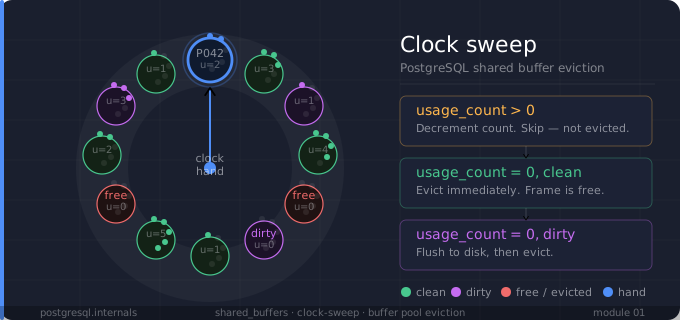
PostgreSQL doesn't use LRU. It uses a clock sweep:
Each buffer has a usage_count (0-5)
A "clock hand" sweeps through buffers
If usage_count > 0: decrement it, skip
If usage_count == 0: evict this buffer (write to disk first if dirty)
Each time a buffer is accessed, its usage_count is incremented
-- See what's currently in the buffer pool
CREATE EXTENSION pg_buffercache;

SELECT c.relname,
       count(*) AS buffers,
       round(count(*) * 8.0 / 1024, 2) AS size_mb,
       round(100.0 * count(*) / (SELECT count(*) FROM pg_buffercache), 2)   AS pct
FROM pg_buffercache b
JOIN pg_class c ON c.relfilenode = b.relfilenode
WHERE b.isdirty IS NOT NULL
GROUP BY c.relname
ORDER BY buffers DESC
LIMIT 20;
WAL Buffers
WAL records are first written into WAL buffers (circular buffer in shared memory). The WAL writer flushes them to disk. Size is wal_buffers (default: auto-tuned to ~1/32 of shared_buffers, min 64kB, max 16MB).
Critical rule: WAL must hit disk before the data page it protects. This is the "write-ahead" guarantee.
CLOG (Commit Log)
The CLOG stores 2 bits per transaction:
00 = IN_PROGRESS
01 = COMMITTED
10 = ABORTED
11 = SUB_COMMITTED
When a backend checks whether a tuple is visible, it looks at xmin/xmax and then checks CLOG to see if that transaction committed or aborted. This is fundamental to MVCC visibility.
CLOG is stored in $PG_DATA/pg_xact on disk, cached in shared memory.
Process Array (ProcArray)
A shared memory array with one slot per active backend. Each slot holds:
Backend PID
Current transaction ID (xid)
Current snapshot info
This is what makes pg_stat_activity work, and it's what MVCC uses to compute snapshots (which transactions are "in flight" right now).
Local Memory
Memory will be allocated per backend not for all.
Example:
work_mem: Uses for sorts, hash joins, etc.
maintenance_work_mem: For VACUUM. CREATE INDEX
temp_buffers: For temp tables
work_mem:
Used for each sort or hash operation in a query. The catch: a single query can use work_mem many times — once per sort node, once per hash join, etc.
-- If a query has 5 sort operations and work_mem = 4MB
-- That query can use up to 20MB of memory

-- When work_mem is exceeded, PostgreSQL spills to disk (temp files)
-- You can detect this:
SELECT query, temp_blks_read, temp_blks_written
FROM pg_stat_statements
WHERE temp_blks_written > 0
ORDER BY temp_blks_written DESC;
maintenance_work_mem:
Used by:
VACUUM: for collecting dead tuple IDs
CREATE INDEX: for sorting index entries
ALTER TABLE ... ADD FOREIGN KEY: for constraint validation.
Can be set much higher than work_mem since only a few maintenance ops run at once. Setting it to 256MB–1GB for CREATE INDEX can dramatically speed things up.
temp_buffers:
Used for temporary tables that are created with "CREATE TEMP TABLE". Separate from the main buffer pool. Default is 8MB.
Part 5: The pg_hba.conf & Authentication Flow
When a client connects, the backend process:
Read pg_hba.conf top-to-bottom
Find the first matching rule (by connection type, database, user, IP)
Applies that authentication method (trust, md5, scram-sha-256, peer, cert, etc..)
If auth passes: loads session parameters from postgresql.conf and role settings.
Sends ReadyForQuery to client
# pg_hba.conf format:
# TYPE   DATABASE   USER    ADDRESS         METHOD
  host   mydb       alice   192.168.1.0/24  scram-sha-256
  host   all        all     0.0.0.0/0       md5
  local  all        all                     peer
Conclusion
Understanding PostgreSQL's process and memory architecture isn't just theoritical, it directly changes how you debug and tune your database.
When a query spills to disk, you now know it's work_mem that ran out. When you see buffer_backends climbing in pg_stat_writer, you know your BGWriter can't keep pace. When a COMMIT feels slow, you know the WAL Writer is the one making the durability guarantee happen before control returns to you.
PostgreSQL isn't magic. It's a carefully engineered system where every process has a job, every memory region has a purpose, and every design decision has a reason. Once you see it clearly, you stop guessing and start reasoning.
What's Next → Module 2: Page Layout & Storage Internals
Everything we discussed — shared buffers, BGWriter, Checkpointer — revolves around one thing: pages. PostgreSQL reads, writes, and caches data in 8KB pages. But what's actually inside one?
In Module 2, we'll crack open a live page using "pageinspect" and read it byte by byte:
How PostgreSQL lays out a heap page — the header, line pointers, and tuples
What a tuple header actually contains (xmin, xmax, infomask, ctid)
How dead tuples accumulate in the same page after updates
How to use pageinspect extension to inspect the real pages in your databases.
Subscribe to the newsletter and get notified via email whenever a new blog goes live.
Enjoyed this post?
29 reactions