PostgreSQL Internals - Module 4: Write-Ahead Logging, Checkpoints and Crash Recovery
Part 4 of 9 in PostgreSQL Internals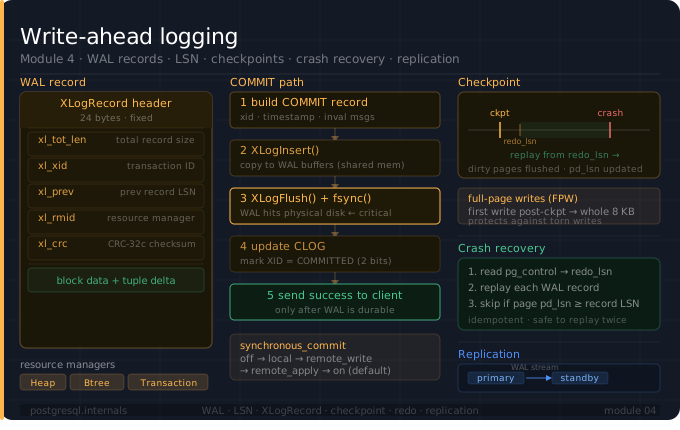
In the previous blogs, we explored the MVCC and Transaction Isolations in the PostgreSQL.
This module 4 is about all about the WAL. WAL is the backbone of PostgreSQL's durability and replication. Every write (e.g., INSERT, UPDATE, DELETE, COMMIT) goes through the WAL before it touches a data page. This module covers the core mechanics of WAL from its physical layout on disk to crash recovery and replication with enough depth to understand what actually happens on each write.
Part 1: Why WAL Exists?
The Problem: Writing an 8KB page to disk is not atomic. If the system crashes mid-write, the page is corrupted. Without WAL, a crash leaves the database in an inconsistent state with no way to recover.
The Solution: With WAL, before any change is applied to a data page, a record describing that change is written to the WAL log. If the system crashes, PostgreSQL just replays the WAL to reconstruct any data page that weren't fully flushed (safely written on disk) before.
Without WAL:
   modify page in memory
   crash
   page is half-written
   The database is corrupt

With WAL:
   write WAL record first
   flush WAL to disk
   modify page in memory
   crash
   replay WAL on restart
   The database is consistent
This is the write-ahead rule: WAL must hit disk before the data page. The WAL writer enforces this and it is never violated.
Part 2: WAL Physical Layout on Disk
WAL files live in $PGDATA/pg_wal/. Each file is exactly 16MB by default. And file size can be configurable with the flag --wal-segsize at initdb time.
WAL Segment Naming
$PGDATA/pg_wal/
   000000010000000000000001   ← segment 1, timeline 1
   000000010000000000000002   ← segment 2
   000000010000000000000002   ← segment 3
... and many more
Each filename is a 24-character hex string broken into three 8-character groups:
00000001 00000000 00000001
-------- -------- --------
timeline log ID   segment ID
Timeline: increments every time you do point-in-time recovery (PITR). Keeps recovered branches separate.
Log ID + Segment ID - together form the position in the WAL stream.
Log Sequence Number (LSN)
An LSN is a 64-bit byte offset into the WAL stream. It uniquely identifies a byte position across all WAL segments.
LSN = 0/1A3F2C0
0 - Log ID
1A3F2C0 - byte offset within the log

-- Convert LSN to segment + offset
segment = LSN / wal_segment_size(=16MB)
offset = LSN % wal_segment_size

-- Queries to get WAL Information
SELECT pg_current_wal_lsn(); -- current write position
-- 0/2278360

SELECT pg_current_wal_insert_lsn();  -- current insert position
-- 0/2278360

SELECT pg_walfile_name(pg_current_wal_lsn()); -- which file we're in
-- 000000010000000000000002

SELECT pg_walfile_name_offset(pg_current_wal_lsn()); -- file + offset
-- (000000010000000000000002,2589536)
Internal Structure of a WAL Segment
Each 16MB segment is divided into 8KB pages (same size as heap pages). Each page has a small header, followed by WAL records.
WAL Segment (16 MB):
┌──────────────────────────────────┐
│ Page 0 (8 KB)                                        │
│  XLogPageHeaderData (20 bytes)                       │
│    xlp_magic    (2B) — 0xD116 identifies WAL         │
│    xlp_info     (2B) — flags                         │
│    xlp_tli      (4B) — timeline ID                   │
│    xlp_pageaddr (8B) — LSN of this page's start      │
│    xlp_rem_len  (4B) — bytes of record continued     │
│  [WAL record 1]                                      │
│  [WAL record 2]                                      │
│  [WAL record 3 — starts here, continues on page 1]   │
├──────────────────────────────────┤
│ Page 1 (8 KB)                                        │
│  XLogPageHeaderData                                  │
│  [continuation of WAL record 3]                      │
│  [WAL record 4]                                      │
│  ...                                                 │
└──────────────────────────────────┘
WAL records can span pages, xlp_rem_len tells the reader how many bytes of the previous record continue on this page.
Now that we know where WAL lives on disk, let's look at what a single WAL record actually contains.
Part 3: The WAL Record: Anatomy
A WAL record has two parts: a fixed header and a variable body. The header (XLogRecord) identifies the record; the body carries the actual change data.
Full Record Layout
─────────────────────────
 XLogRecord (24 bytes)                     ← fixed header
   xl_tot_len, xl_xid, xl_prev,
   xl_info, xl_rmid, xl_crc
─────────────────────────
 XLogRecData — main data block             ← rmgr-specific payload
   e.g. xl_heap_insert struct for INSERT
       (offset on page, flags)
─────────────────────────
 Block Reference(s)  [0..MAX_BLOCKS]       ← one per modified buffer
   RelFileLocator (tablespace/db/rel)
   BlockNumber
   fork number (main/fsm/vm)
   [optional: Full-Page Write image]
─────────────────────────
How a resource manager (discussed below) registers this at write time
/* How Heap rmgr builds an INSERT record — simplified from heapam.c */

XLogBeginInsert();

/* 1. Register main payload — the rmgr-specific struct */
XLogRegisterData((char *) &xlrec, sizeof(xl_heap_insert));

/* 2. Register the modified buffer — triggers Full-Page Write (Discussed below) if needed */
XLogRegisterBuffer(0, buffer, REGBUF_STANDARD);

/* 3. Register the tuple data itself */
XLogRegisterBufData(0, (char *) tupledata, tuple_len);

/* 4. Finalize — returns the LSN of this record */
recptr = XLogInsert(RM_HEAP_ID, XLOG_HEAP_INSERT);
Resource Managers (rmgr)
The xl_rmid field in the above structure (XLogRecord) identifies which subsystem generated this WAL record. Each subsystem is a "resource manager" responsible for replaying its own records. Some resource managers and what they log:
XLOG (Id = 0): Checkpoint, switch, backup, full-page writes
Transaction (Id = 1): COMMIT, ABORT, PREPARE, sub transaction
Storage (Id = 2): Relation files creation/deletion
CLOG (Id = 3): Commit log page updates
Database (Id = 4): CREATE/DROP DATABASE
Tablespace (Id = 5): CREATE/DROP TABLESPACE
MultiXact (Id = 6): Multi-transactions, mainly row lock sharing
RelMap (Id = 7): Catalog relation mapping updates
Standby (Id = 8): Standby snapshot, lock info for hot standby
Heap2 (Id = 9): VACUUM, FREEZE, VISIBLE flag changes
Heap (Id = 10): INSERT, UPDATE, DELETE, HOT_UPDATE, LOCK
Btree (Id = 11): Index insert, split, delete, newroot
Hash (Id = 12): Hash Index operations
Gin (Id = 13): GIN index operations
Gist (Id = 14): GiST Index operations
Sequence (Id = 15): Sequence increment
SPGist (Id = 16): SP-GiST Index operations
BRIN (Id = 17): BRIN Index operations
Full-Page Writes
The first time a page is modified after a checkpoint, PostgreSQL writes the entire 8KB page into the WAL record (not just the change). This is called a Full-Page Write.
Why? Because during crash recovery, a page might be half-written when the crash occurs. Replaying just the delta record (like only changes after crash) onto a corrupt page would produce garbage. The Full-Page Writes ensures recovery always starts from a known-good page.
SHOW full_page_writes; -- should be 'on'After the first modification post-checkpoint, subsequent changes to the same page within the same checkpoint interval write only the delta (the specific bytes changed). Much smaller.
Part 4: The COMMIT Path
This is what happens, step by step, when user issues "COMMIT":
1. Backend calls RecordTransactionCommit()

2. Builds a COMMIT WAL record (rmgr=Transaction):
   - xl_xid = transaction ID
   - commit timestamp
   - list of subtransaction IDs
   - list of invalidation messages (for catalog cache)

3. Calls XLogInsert() - copies record into WAL buffers
   -- WAL buffers: circular buffer in shared memory"

4. Calls XLogFlush(commit_lsn):
   - if synchronous_commit = on:
      WAL writer calls write() + fsync()
      blocks until OS confirms data on physical disk
   - if synchronous_commit = off:
      returns immediately - WAL may still be in OS buffer

5. Updates CLOG: marks XID as COMMITTED

6. Sends "command complete" to client
This is why COMMIT is fast even for large transactions because only the WAL record is fsynced (written to disk), not the data pages. The data pages are written lazily by the background writer and checkpointer.
synchronous_commit levels
off                = return after WAL in local memory
local              = return after WAL fsynced locally
remote_write       = return after WAL written (not fsynced) on replica
remote_apply       = return after WAL applied on replica
on (default)       = return after WAL fsynced locally
Part 5: Checkpoints
A checkpoint is a point in time where PostgreSQL guarantees all dirty data pages have been flushed to disk. After a checkpoint, crash recovery only needs to replay WAL from that checkpoint forward, not again from the beginning of time.
This is what happens, step by step, during a checkpoint:
1. Checkpointer wakes up (timeout or WAL size trigger)

2. Writes a CHECKPOINT BEGIN WAL record with:
    - redo_lsn: the LSN from which recovery must start
    - this_lsn: the LSN of the checkpoint record itself

3. Scans the buffer pool for dirty pages
   For each dirty page:
     a. If page's pd_lsn > redo_lsn and no Full-Page Write (see Part 3: Full-Page Writes) yet:
         write Full-Page Write WAL record for this page
     b. write() the page to its data file
     (spread over time to avoid I/O spike
      i.e write happens in over several intervals)

4. Calls fsync() on all data files
     - Now the pages are guaranteed durable

5. Writes a CHECKPOINT END WAL record

6. Updates pg_control file with new checkpoint location
pg_control
pg_control is the "source of truth" for recovery and important file in the postgresql.
# Read the pg_control file (run in bash, not in psql)
pg_controldata $PGDATA

# Key fields:
# Latest checkpoint location:     0/1A3F058
# Prior checkpoint location:      0/1A2F000
# Latest checkpoint's REDO lsn:   0/1A3F000
# Database cluster state:         in production
# Latest checkpoint's TimeLineID: 1
During crash recovery, PostgreSQL reads pg_control to find where the last checkpoint was, seeks to that LSN in the WAL, and replays forward.
Checkpoint Tuning
SHOW checkpoint_timeout; -- default 5min: time between checkpoints
SHOW max_wal_size; -- default 1GB: WAL size that triggers checkpoint
SHOW checkpoint_completion_target; -- default 0.9: spread I/O over 90% of interval

-- Monitor checkpoint frequency and duration:
SELECT checkpoints_timed,
       checkpoints_req,
       checkpoint_write_time,
       checkpoint_sync_time,
       buffers_checkpoint
FROM pg_stat_bgwriter;
If checkpoints_req is high, your max_wal_size is too small, checkpoints are being forced by WAL volume rather than schedule, so try to increase max_wal_size.
With checkpoints in place, let's see how PostgreSQL actually uses them during crash recovery.
Part 6: Crash Recovery
What happens when PostgreSQL starts after a crash:
1. Read pg_control
   - Find last checkpoint LSN and redo_lsn

2. Open WAL segment containing redo_lsn

3. For each WAL record from redo_lsn to end of WAL:
   a. Read record, validate checksum using CRC (Cyclic Redundancy Check)
   b. Look up resource manager by xl_rmid
   c. Call rmgr->redo(record)
      For a Heap INSERT record:
        - load the target page into shared buffers
        - check page's pd_lsn v/s record's LSN
        - if page pd_lsn >= record LSN:
           SKIP (page already has this change)
        - else:
           apply the change to the page
           update pd_lsn = record LSN

      For a COMMIT record:
         - mark XID committed in CLOG

4. When end of WAL reached: recovery complete

5. Write new checkpoint

6. PostgreSQL starts listening..
The pd_lsn >= record LSN check is the idempotency guard, it makes recovery safe to run multiple times. If a page was already written to disk with a change before the crash, replaying that WAL record does nothing.
Part 7: WAL and Replication
WAL is the replication medium.
Physical/Streaming Replication
Streaming replication works by shipping WAL records from primary to standby in real time.
Primary                              Standby
  │                                    │
  │── WAL record written ────────│
  │                                    │── WAL receiver writes to pg_wal
  │                                    │── startup process replays record
  │                                    │── standby's pd_lsn advances
  │◄─ acknowledgement (replay_lsn) ─│
Logical Replication
Logical replication decodes WAL records into SQL-level changes (INSERT/UPDATE/DELETE) using logical decoding. The pg_logical output plugin (PostgreSQL's built-in logical decoder) reads WAL and emits row-level changes, which subscribers apply to their own tables.
-- Create a logical replication slot
SELECT pg_create_logical_replication_slot('my_slot', 'pgoutput');

-- Peek at decoded changes
SELECT * FROM pg_logical_slot_get_changes('my_slot', NULL, NULL);
Replication Slots and WAL Retention
Every replication slot (physical or logical) holds a restart_lsn the oldest WAL position the slot still needs. PostgreSQL will never recycle WAL segments below that LSN, regardless of max_wal_size.
Primary WAL stream:
─────────────────────────────────────►
  seg 1    seg 2    seg 3    seg 4    seg 5 (current)
           └── slot restart_lsn stuck here
               segs 2, 3, 4 cannot be recycled
               WAL accumulates on disk
If a standby goes down or a logical subscriber stops consuming, its slot's restart_lsn freezes. WAL accumulates. When disk fills up, PostgreSQL either stops WAL archiving or crashes.
Monitor all slots and how much WAL they are retaining
SELECT
    slot_name,
    slot_type,
    active,
    restart_lsn,
    pg_size_pretty(
        pg_wal_lsn_diff(pg_current_wal_lsn(), restart_lsn)
    ) AS retained_wal
FROM pg_replication_slots
ORDER BY retained_wal DESC;

-- Example output:
--  slot_name  | slot_type | active | restart_lsn | retained_wal
-- ───────────────────────────────────────
--  my_slot    | logical   | f      | 0/5A000000  | 2147 MB   ← danger
--  standby_1  | physical  | t      | 0/8F320000  | 12 MB     ← fine
Prevent unbounded WAL retention with a safety limit:
-- postgresql.conf
max_slot_wal_keep_size = 10GB   -- PostgreSQL 13+
-- If a slot falls behind by more than this, PostgreSQL
-- invalidates the slot automatically rather than filling disk

-- Check if any slot has been auto-invalidated
SELECT slot_name, invalidation_reason
FROM pg_replication_slots
WHERE invalidation_reason IS NOT NULL;
This is one of the most common production WAL crises — a forgotten logical replication slot silently accumulating gigabytes until the server runs out of disk. Monitoring retained_wal per slot should be part of any PostgreSQL alerting setup.
Part 8: WAL Compression and Tuning
-- Key WAL parameters in postgresql.conf:

-- wal_level = minimal | replica  | logical
wal_level = minimal -- fastest, no replication possible
                    -- skips WAL for COPY/CREATE TABLE AS on new tables

wal_level = replica -- default, enables physical standby + pg_basebackup
wal_level = logical -- enables logical decoding, logs full row identity

wal_compression = on -- compress Full-Page Write images

wal_buffers = 16MB   -- in-memory WAL buffer

wal_writer_delay = 200ms   -- how often WAL writer flushes
wal_writer_flush_after = 1MB -- flush when this much WAL accumulated

min_wal_size = 80MB        -- keep at least this much WAL on disk
max_wal_size = 1GB         -- trigger checkpoint at this WAL volume

archive_mode = on          -- enable WAL archiving
archive_command = 'cp %p /mnt/wal_archive/%f'  -- copy to archive location

-- Monitoring --
------------------------------------------------------------
-- WAL generation rate
SELECT pg_size_pretty(
    pg_wal_lsn_diff(pg_current_wal_lsn(), '0/0')
) AS total_wal_generated;

-- WAL files currently on disk
SELECT count(*) AS wal_files,
       pg_size_pretty(count(*) * 16 * 1024 * 1024) AS total_size
FROM pg_ls_waldir();
Part 9: Hands-On Lab
create table orders (id int primary key, name text);

-- 1. Watch your LSN advance with each operation
SELECT pg_current_wal_lsn(); --  0/22A62F0
INSERT INTO orders VALUES (999, 'test'); -- Inserts 1 row
SELECT pg_current_wal_lsn() ; --  0/22A6400
-- Here, Difference show how many bytes of WAL produced by INSERT

-- 2. Measure WAL bytes per operation
SELECT pg_wal_lsn_diff('0/22A6400', '0/22A62F0'); -- 272 bytes

-- 3. See current WAL files
SELECT name, size, modification FROM pg_ls_waldir() ORDER BY modification DESC LIMIT 5;
--           name           |   size   |       modification
-- 000000010000000000000002 | 16777216 | 2026-04-17 19:08:49+05:30
-- 000000010000000000000003 | 16777216 | 2026-03-28 11:06:35+05:30

-- 4. Find what WAL file your current LSN is in
SELECT pg_walfile_name(pg_current_wal_lsn()); -- 000000010000000000000002

-- 5. Manually force a checkpoint and time it
\timing on
CHECKPOINT;
\timing off -- 104.841 ms

-- 6. Read checkpoint info
SELECT * FROM pg_control_checkpoint();
-- checkpoint_lsn       | 0/22A66D8
-- redo_lsn             | 0/22A66A0
-- redo_wal_file        | 000000010000000000000002
-- timeline_id          | 1
-- prev_timeline_id     | 1
-- full_page_writes     | t
-- next_xid             | 0:9144
-- next_oid             | 34964
-- next_multixact_id    | 1
-- next_multi_offset    | 0
-- oldest_xid           | 561
-- oldest_xid_dbid      | 1
-- oldest_active_xid    | 9144
-- oldest_multi_xid     | 1
-- oldest_multi_dbid    | 1
-- oldest_commit_ts_xid | 0
-- newest_commit_ts_xid | 0
-- checkpoint_time      | 2026-04-18 08:36:30+05:30

-- 7. Decode actual WAL records with pg_waldump
-- First, note your LSN range from step 1 and 2
-- Start LSN: 0/22A62F0  |  End LSN: 0/22A6400
-- (run in shell, not psql)
pg_waldump -p $PGDATA/pg_wal \
           -s 0/22A62F0 \
           -e 0/22A6400

-- Expected output:
-- rmgr: Heap        len (rec/tot):     59/272,  tx: 9143,
-- lsn: 0/022A62F0,  prev 0/022A6278,
-- desc: INSERT off 1, blkref #0: rel 1663/16384/16385 blk 0 FPW
Understanding pg_waldump result
rmgr: Heap
Resource manager is Heap rmgr with ID: 10 (check Resource Managers part)
len (rec/tot): 59/272
59 bytes is the rmgr payload
272 is total with Full-Page writes image
tx: 494
Transaction ID that produced this record
lsn: 0/022A62F0
this record's position in the WAL stream
prev: 0/022A6278
LSN of the previous record (forms a linked list)
blkref #0: ... FPW
block reference, FPW present (first write after checkpoint)
Conclusion
In this module explored how WAL (Write-Ahead Logging) works in PostgreSQL in detail, starting from:
Why WAL exists: the write-ahead rule and the durability guarantee it provides
How WAL is physically laid out on disk: segments, pages, and the LSN addressing system
The exact anatomy of a WAL record:
XLogRecord, resource managers, and full-page writesWhat happens byte-by-byte when you
COMMIT: fromXLogInsert()tofsync()to the client success responseHow checkpoints bound recovery time and what
pg_controlstores as the source of truthThe crash recovery sequence : reading
redo_lsn, replaying records, and thepd_lsnidempotency guardHow WAL powers both physical streaming replication and logical decoding
And many more
What's Next → Module 5: Query pipeline (Parser → Planner → Executor)
You now understand how every write is made durable and how PostgreSQL survives crashes.
Module 5 goes into the query execution layer. We'll cover how the parser turns raw SQL text into a parse tree, how the rewriter expands views and applies rules, how the planner generates candidate execution plans and picks the cheapest one using cost estimates and table statistics, and how the executor drives the chosen plan node by node to produce your result rows.
Enjoyed this post?
6 reactions